The best Rainbow Six Siege sensitivity settings in 2026 start with control, not speed: 800 DPI, 8 to 12 horizontal and vertical sensitivity on PC, Advanced ADS enabled, 35 to 50 on low-zoom scopes, raw input on, V-Sync off, and graphics tuned for stable FPS. Siege rewards holding pixel angles, recoil control, sound discipline and small corrections more than huge flicks.
This guide covers best sensitivity settings, best sensitivity for pc, best mouse sensitivity, best dpi settings, best ads sensitivity, best aim settings, best graphics settings, best fps settings, best performance settings, best competitive settings, low input lag settings, best controller settings, best controller sensitivity, best aim assist settings, best deadzone settings and best trigger settings for Rainbow Six Siege.
Before you queue ranked: stock up for your next Battle Pass, elite skin or game credit purchase with gaming gift cards from AR-PAY and keep your payment quick, secure and separate from your platform account.
Best Rainbow Six Siege Sensitivity Settings
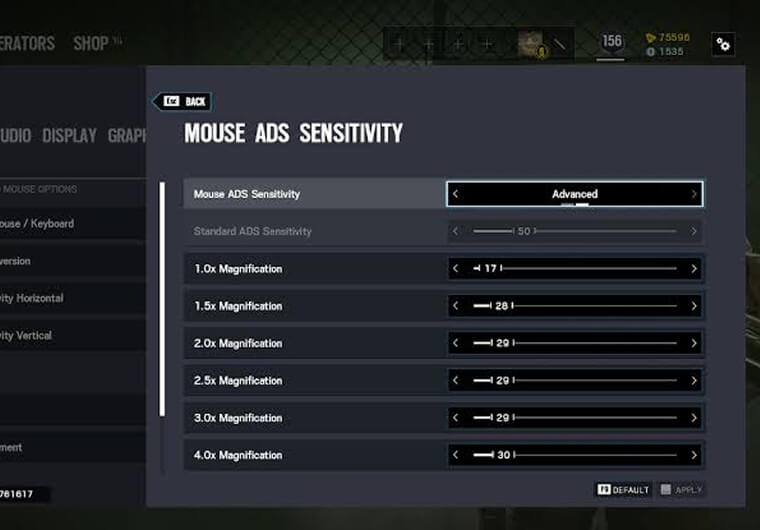
For most PC players, the best Rainbow Six Siege sensitivity settings are low enough to track head-height lines without shaking, but high enough to turn from a flank. A safe starting point is 800 DPI with 10 horizontal, 10 vertical and Advanced ADS values between 35 and 50 for common scopes. If you use 400 DPI, double the in-game feel gradually; if you use 1600 DPI, cut the in-game numbers down.
| Setting | Recommended baseline | Why it works |
|---|---|---|
| Mouse DPI | 800 DPI | Easy desktop control with precise Siege tuning. |
| Horizontal sensitivity | 8 to 12 | Fast enough for room clears without ruining pixel-angle control. |
| Vertical sensitivity | 8 to 12 | Keeps recoil correction predictable across weapons. |
| ADS mode | Advanced | Lets every optic feel controlled instead of forcing one slider. |
| 1.0x ADS | 35 to 45 | Good for holo/reflex fights and recoil control. |
| 2.5x ADS | 45 to 55 | Keeps magnified scopes usable without feeling frozen. |
| FOV on PC | 84 to 90 | More awareness while keeping targets readable. |
| V-Sync | Off | Reduces input delay for ranked gunfights. |
If your aim feels too loose, lower horizontal and vertical by 1 point first. If your aim feels too slow, raise horizontal by 1 point and leave ADS untouched for two matches. Do not change DPI, FOV, ADS and graphics together; Siege has too many variables for that to teach you anything useful.
Best Sensitivity for PC in Rainbow Six Siege
The best sensitivity for pc is usually a low-to-medium setup. Siege is not Apex Legends or Fortnite; you are often pre-aiming a doorway, slicing a room, holding a head hole or controlling recoil through a long angle. That is why many players feel better around 800 DPI with 8 to 12 in-game sensitivity than at very high desktop DPI with twitchy camera movement.
A practical test is simple: if your crosshair floats past heads while holding a tight angle, lower sensitivity. If you cannot clear a close swing without lifting your mouse, raise horizontal sensitivity slightly. The best mouse sensitivity is the one that keeps your first bullet on head level while still letting you react to a rotate behind you.
Best Rainbow Six Siege DPI Settings
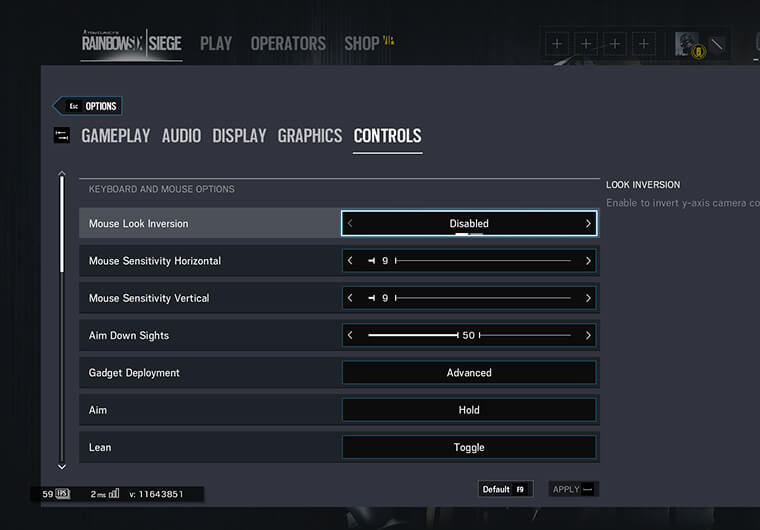
The best Rainbow Six Siege DPI settings are 400, 800 or 1600 DPI. For most players, 800 DPI is the cleanest baseline because it works well in menus and gives enough in-game range for fine tuning. Use 400 DPI if you prefer arm aim and a large mousepad. Use 1600 DPI only if your in-game sensitivity is low enough to avoid shaky micro-corrections.
- 400 DPI: try 16 to 24 horizontal/vertical if you want a similar feel to 800 DPI at 8 to 12.
- 800 DPI: try 8 to 12 horizontal/vertical for a balanced ranked baseline.
- 1600 DPI: try 4 to 6 horizontal/vertical and avoid raising ADS too aggressively.
DPI, eDPI and Pro Settings Explained
eDPI is a useful comparison metric: DPI multiplied by in-game sensitivity. Siege does not feel identical to every shooter because FOV, ADS, scopes and recoil all change the practical feel, but eDPI still helps you compare low, medium and high sensitivity ranges without copying blindly.
- 800 DPI x 10 in-game sensitivity gives a practical 80 eDPI-style reference point for Siege comparisons.
- 400 DPI x 20 in-game sensitivity creates a similar broad feel with more arm movement.
- 1600 DPI x 5 in-game sensitivity can work if your mouse sensor and hand control stay steady.
Pro settings are best used as a range, not a command. A pro entry player may prefer faster horizontal movement for quick clears, while a support player holding long angles may prefer slower ADS control. Copy the principle: stable FPS, controlled ADS, clean visibility and repeatable recoil practice.
Best ADS Sensitivity for Rainbow Six Siege
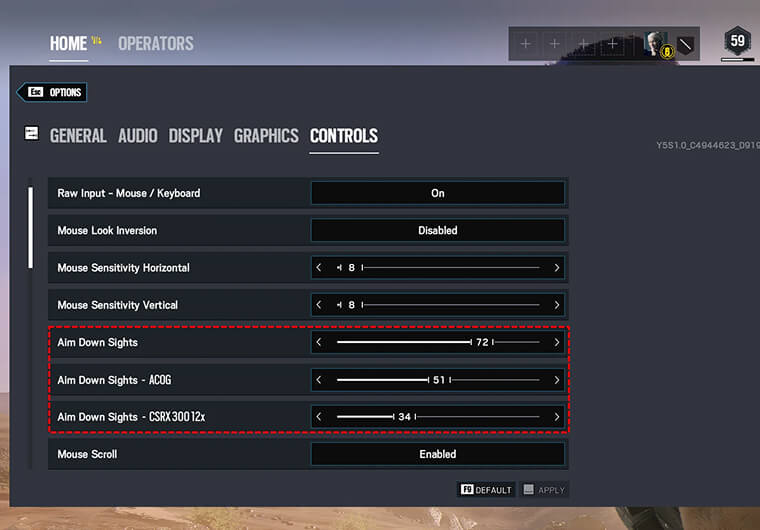
Ubisoft’s official ADS sensitivity guide explains that Siege uses Advanced ADS sliders per zoom level and notes that a value of 50 is the neutral baseline for new players: Ubisoft ADS Sensitivity Guide. That does not mean 50 is perfect for everyone. It means 50 is the clean starting point before you tune for recoil, scope preference and FOV.
For the best ads sensitivity, keep 1.0x slightly controlled and raise higher magnification scopes only if they feel too slow. Siege’s gunfights often happen through small gaps, so an ADS value that feels fast in the range can feel messy in ranked.
- 1.0x sights: 35 to 45 for holo, reflex and red dot control.
- 2.5x scopes: 45 to 55 if you need smoother long-angle correction.
- 3.5x and above: 50 to 65 only if you can hold recoil without overdragging.
- Keep Advanced ADS on so each optic can be tuned separately.
Best Aim Settings for Ranked Control
The best aim settings in Rainbow Six Siege combine sensitivity, ADS, FOV, input and recoil practice. Start with raw input on, mouse acceleration off, a stable polling rate, fullscreen mode and one sensitivity profile for at least a week. Changing settings after every bad map is one of the fastest ways to lose consistency.
A strong 15-minute test is: clear Terrorist Hunt or target drills for five minutes, play one unranked or arcade round focusing only on head height, then review whether misses came from overflicking, underflicking or recoil drag. Fix the mistake you see most often, not the setting you blame first.
Best Rainbow Six Siege Crosshair Codes
There are no true Best Rainbow Six Siege Crosshair Codes like Valorant crosshair import strings. Siege does not work around shareable crosshair codes. The closest useful settings are reticle color, reticle opacity, optic choice and sight preference. For competitive visibility, choose a color that does not disappear on bright maps, keep opacity high, and avoid changing optics just because a pro used one highlight clip.
If you want a practical crosshair-style baseline, use a bright reticle color, high opacity, a 1.0x optic for entry weapons you control well, and a 2.5x optic only when the weapon, role and map angle justify it. Your reticle should help you read heads quickly, not decorate the screen.
Best Rainbow Six Siege Graphics Settings
The best Rainbow Six Siege graphics settings protect visibility and input response. Use fullscreen mode, native resolution, V-Sync off, low-to-medium shadows, texture quality based on VRAM, and effects settings that do not bury enemies in visual noise. Siege is readable when edges, movement and contrast stay clear.
- Display mode: Fullscreen.
- Refresh rate: match your monitor refresh rate.
- V-Sync: Off for lower input lag.
- Texture quality: Medium or High if VRAM allows; Low on older cards.
- Shadows: Medium can preserve useful player shadow information; lower only if FPS is unstable.
- Ambient occlusion, lens effects and motion blur: Off for cleaner visibility.
Best Rainbow Six Siege Settings for Low-End PCs
For low-end PCs, tune around stable frames first. Ubisoft’s system requirements page lists current storage and hardware guidance for Siege: Rainbow Six Siege system requirements. If your PC struggles during explosions, smokes or utility-heavy executes, your sensitivity will feel inconsistent even if the number is technically good.
The best Rainbow Six Siege settings for low-end PCs are fullscreen mode, the lowest resolution scale you can tolerate, V-Sync off, texture quality matched to VRAM, low effects and a frame cap your system can actually hold. A locked 90 FPS feels better than 160 FPS that drops to 65 during a site execute.
Best Rainbow Six Siege Settings for FPS
The best Rainbow Six Siege settings for FPS are the settings that stay stable when utility fills the screen. Prioritize fullscreen mode, clean GPU drivers, low background apps, no recording overlay if it causes stutter, and a realistic FPS cap. High peak FPS looks good in a benchmark, but ranked gunfights care more about frame-time consistency.
Use low input lag settings together: V-Sync off, wired mouse or controller, stable polling rate, fullscreen mode, and a monitor refresh rate selected correctly inside the game. If a setting improves average FPS but makes visibility worse, test it in real maps before keeping it.
Best Performance Settings and Low Input Lag Settings
Best performance settings should make Siege feel immediate. Keep Windows pointer acceleration off, close game bars or overlays that record in the background, set your mouse profile in one software tool, and avoid changing polling rate daily. Input lag can make a good sensitivity feel late, especially when holding tiny angles.
Ubisoft’s current roadmap was last updated on July 2, 2026 and lists Y11S2 Operation System Override as the latest release, with Ranked 3.0, Calypso Casino and ongoing balancing cadence: Rainbow Six Siege roadmap. Because Siege changes every season, retest sensitivity after large ranked, recoil, map or operator updates.
Best Competitive Settings for Siege Ranked
The best competitive settings are disciplined and repeatable. Use one DPI, one sensitivity range, one ADS philosophy and one visual preset long enough to collect real evidence. Siege has many rounds where you die because of positioning, sound, timing or utility, not sensitivity. Do not let one bad death rewrite your entire setup.
- Use Advanced ADS, then tune common optics first.
- Keep FOV high enough for awareness but not so wide that targets feel tiny.
- Use audio settings that make footsteps and vertical sound easier to read.
- Avoid unnecessary visual effects before ranked.
- Warm up recoil and crosshair placement before changing numbers.
Best Controller Settings for Rainbow Six Siege
The best controller settings for Rainbow Six Siege should help you hold steady angles without making close swings impossible. Start around 25 to 35 vertical, 45 to 65 horizontal, low deadzone, Classic controller rotation if it feels more predictable, vibration off, and ADS values you can control under recoil.
For best controller sensitivity, raise horizontal before vertical. Vertical sensitivity affects recoil correction, so too much vertical speed can make SMGs and high-rate-of-fire weapons harder to keep on target.
- Best controller sensitivity: medium horizontal, lower vertical, then tune ADS by optic.
- Best deadzone settings: as low as possible without stick drift, often around 5 to 8 on healthy sticks.
- Best trigger settings: short trigger stops or hair triggers if they do not cause accidental shots.
- Best aim assist settings: do not build ranked muscle memory around aim assist; if the option appears in training modes, keep PvP practice focused on raw stick control.
How to Find Your Best Siege Sensitivity in 20 Minutes
Use a controlled test instead of copying a random pro settings screenshot.
- Set 800 DPI, 10 horizontal, 10 vertical and Advanced ADS on.
- Use 40 ADS on 1.0x and 50 ADS on 2.5x as the first test.
- Play a training drill or arcade mode while holding head-height angles.
- If you pass targets, lower horizontal or ADS by 1 to 3 points.
- If you stop short, raise horizontal or ADS by 1 to 3 points.
- Play two real matches before making another change.
The best settings are not the ones that feel exciting for five minutes. They are the ones that keep your crosshair calm when the round is loud, the timer is low and the enemy swings the angle you expected.
Quick Checklist Before You Save Your Settings
- DPI fixed in mouse software.
- Mouse acceleration off.
- Advanced ADS enabled and tuned by scope.
- V-Sync off and fullscreen on.
- FPS stable in real maps, not only menus.
- Controller deadzone tested for drift.
- One reticle color and opacity used for at least a week.
Ready to lock in your setup and play with fresh credit? Use ARPAY gaming gift cards for fast top-ups, Battle Pass credit or platform balance before your next Siege session.
FAQ
What are the best Rainbow Six Siege sensitivity settings?
The best Rainbow Six Siege sensitivity settings for most PC players are 800 DPI, 8 to 12 horizontal and vertical sensitivity, Advanced ADS enabled, and 35 to 50 ADS for common low-zoom scopes.
What is the best DPI for Rainbow Six Siege?
The best DPI for Rainbow Six Siege is usually 800 DPI because it balances desktop control and in-game precision. 400 DPI is also good for arm aim, while 1600 DPI needs lower in-game sensitivity.
What is the best ADS sensitivity for Rainbow Six Siege?
The best ADS sensitivity depends on optic and FOV, but 35 to 45 for 1.0x and 45 to 55 for 2.5x is a strong starting point. Use Advanced ADS so each scope can be tuned separately.
Does Rainbow Six Siege have crosshair codes?
No. Rainbow Six Siege does not use shareable crosshair codes like Valorant. Tune reticle color, reticle opacity, optic choice and visibility instead.
What are the best Rainbow Six Siege settings for FPS?
The best Rainbow Six Siege settings for FPS are fullscreen mode, V-Sync off, stable refresh rate, low visual effects, VRAM-appropriate textures and a realistic frame cap if your PC stutters.
What are the best controller settings for Rainbow Six Siege?
The best controller settings use medium horizontal sensitivity, lower vertical sensitivity, low deadzone without drift, vibration off, controlled ADS values and trigger stops if your controller supports them.