Best Fortnite Sensitivity Settings Quick Table
The best Fortnite sensitivity settings in June 2026 are built around control first: 800 DPI, 7% to 9% X/Y sensitivity, 50% to 70% targeting sensitivity, and a scope sensitivity near 50% for most mouse and keyboard players.
Controller players should start around 40% to 45% look sensitivity, 9% to 12% ADS sensitivity, and a 5% to 8% deadzone if their sticks do not drift.
| Setting | Recommended value | Why it works |
|---|---|---|
| Mouse DPI | 800 DPI | Common competitive baseline with enough speed for building and editing. |
| X-Axis Sensitivity | 7% to 9% | Keeps turns quick without making tracking unstable. |
| Y-Axis Sensitivity | 7% to 9% | Matching X/Y keeps muscle memory consistent. |
| Targeting Sensitivity | 50% to 70% | Helps ADS aim stay controlled at medium range. |
| Scope Sensitivity | 45% to 60% | Useful for scoped weapons without over-flicking. |
Best Fortnite Mouse Sensitivity for PC
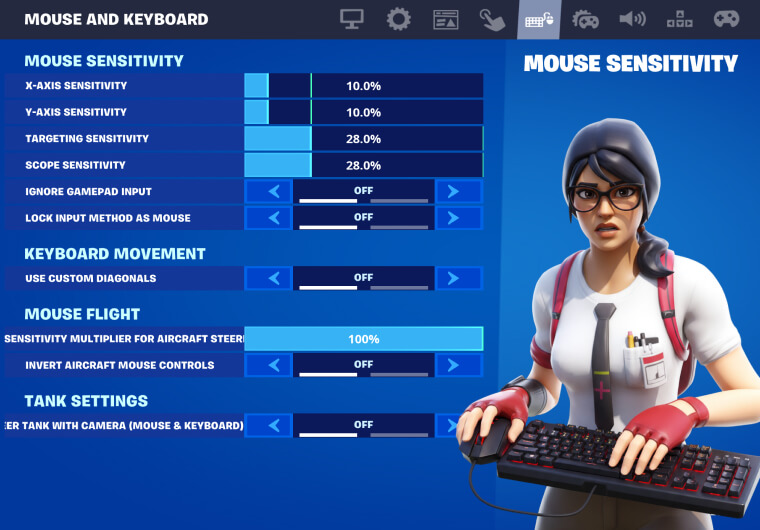
For PC, start with 800 DPI and 8% X/Y sensitivity. This creates an eDPI of 64, which sits in a practical middle range for Fortnite: fast enough for building, but not so fast that your crosshair skips past targets.
If your aim feels shaky, reduce X/Y to 7%. If you run out of mousepad during turns, raise it toward 9% or 10%. Avoid changing DPI and in-game sensitivity at the same time. Change one value, play three matches, then adjust again.
Best Fortnite DPI Settings
The best Fortnite DPI setting for most players is 800. Some low-sensitivity players prefer 400 DPI with higher in-game sensitivity, while high-speed builders may use 1600 DPI with lower in-game values. The final feel can be similar, but 800 DPI is easier to tune and works well across menus, aim trainers, and Windows settings.
| DPI | Suggested X/Y | Player type |
|---|---|---|
| 400 | 12% to 16% | Arm aimers with large mousepads. |
| 800 | 7% to 9% | Most competitive PC players. |
| 1600 | 3.5% to 5% | Wrist aimers or small desk setups. |
Best Fortnite ADS Sensitivity
Use 50% to 70% targeting sensitivity and 45% to 60% scope sensitivity. Fortnite fights often move from shotgun range to AR pressure in seconds, so ADS should feel slower than hip-fire but not heavy.
If you miss long-range tags because the crosshair jumps too far, lower targeting sensitivity by 5%. If you cannot track players gliding or sprinting sideways, raise it by 5%.
Best Fortnite Controller Sensitivity
For controller, a balanced June 2026 setup starts with 42% look horizontal speed, 42% look vertical speed, 10% ADS horizontal, 10% ADS vertical, and 6% deadzone on both sticks. Keep aim assist enabled and use Advanced Options so you can tune each value separately.
| Controller setting | Recommended value |
|---|---|
| Look Horizontal Speed | 40% to 45% |
| Look Vertical Speed | 40% to 45% |
| ADS Horizontal Speed | 9% to 12% |
| ADS Vertical Speed | 9% to 12% |
| Build Mode Multiplier | 1.8x to 2.2x |
| Edit Mode Multiplier | 1.8x to 2.2x |
| Left/Right Stick Deadzone | 5% to 8% |
Best Fortnite Graphics Settings for Low Input Lag
Sensitivity feels worse when frame rate is unstable. For competitive play, use Fullscreen mode, cap FPS near your monitor refresh rate, keep 3D Resolution at 100%, and lower shadows, effects, and post-processing. On supported PCs, Performance Mode is still the cleanest route for high FPS and low input delay.
For most players, the target is simple: hold a stable 144 FPS or higher if your monitor supports it. A slightly lower but stable frame rate is better than a higher number that drops during fights.
How to Test Your Fortnite Sensitivity
Use one creative aim map, one edit course, and three real matches before changing settings again. Track three things: whether you over-flick shotgun shots, whether AR tracking feels smooth, and whether you can turn fast enough when boxed.
If two of those feel good, keep the setting. If all three feel bad, your sensitivity is probably too far from your natural aim style.
Conclusion
The best Fortnite sensitivity settings are the ones that keep your aim controlled while still letting you build, edit, and react quickly. For June 2026, start with 800 DPI, 7% to 9% X/Y sensitivity, controlled ADS values, and a stable low-lag graphics setup. Then test small 5% adjustments instead of copying every pro setting blindly.
This guide should sit at the start of the Fortnite settings cluster. Link it forward to the next articles on FNCS champion pro settings, controller settings, crosshair settings, and low-end PC FPS settings as they go live.
If you are tuning settings before buying cosmetics or Battle Pass currency, ARPAY also has a quick guide to Fortnite V-Bucks Gift Cards.
FAQ
What are the best Fortnite sensitivity settings in June 2026?
The best starting point is 800 DPI, 7% to 9% X/Y sensitivity, 50% to 70% targeting sensitivity, and 45% to 60% scope sensitivity.
What DPI do most Fortnite players use?
Many competitive Fortnite players use 800 DPI because it balances quick building with stable aim. Some players still prefer 400 DPI or 1600 DPI depending on desk space and aiming style.
What is the best Fortnite controller sensitivity?
Start around 40% to 45% look sensitivity, 9% to 12% ADS sensitivity, and 5% to 8% deadzone. Lower deadzone feels faster, but raise it if your controller has stick drift.
Should Fortnite X and Y sensitivity match?
Yes. Matching X and Y sensitivity keeps vertical and horizontal aim predictable, especially while editing, building, and fighting at close range.