Best Call of Duty Warzone Sensitivity Settings 2026
The best Call of Duty Warzone sensitivity settings in 2026 are built around control first: 6-6 or 7-7 controller sensitivity, Dynamic aim response curve, low deadzones, 0.75 to 0.90 low-zoom ADS, and standard aim assist. For mouse and keyboard, start with 800 DPI, 5.00 to 7.00 in-game sensitivity, Relative ADS sensitivity, and a 0.80 to 1.00 ADS multiplier.
That is the safest starting point because Warzone fights move between two jobs: snapping fast in close quarters and holding recoil across long lanes. Too high, and you overshoot. Too low, and fast players slide through your camera.
Best Warzone Sensitivity Settings Quick Table
| Setting | Best starting point | Why it works |
|---|---|---|
| Controller horizontal sensitivity | 6 or 7 | Fast enough for close fights without losing recoil control |
| Controller vertical sensitivity | 6 or 7 | Keep it matched unless vertical recoil feels too jumpy |
| ADS low zoom multiplier | 0.75 to 0.90 | Slows aim just enough for AR and SMG tracking |
| ADS high zoom multiplier | 0.85 to 1.00 | Keeps sniper and long-range optics from feeling heavy |
| Aim response curve | Dynamic | Gives quick turn-in with smoother micro-adjustments |
| Aim assist type | Default or Black Ops | Reliable tracking without changing muscle memory too much |
| Left/right stick min deadzone | As low as possible without drift | Removes delay from tiny aim and movement inputs |
| Mouse DPI | 800 | Easy baseline for menus, Windows, aim trainers and Warzone |
| Mouse sensitivity | 5.00 to 7.00 | Practical middle range for 800 DPI |
| Mouse ADS multiplier | 0.80 to 1.00 | Keeps recoil and target switching controlled |
Best Sensitivity for PC
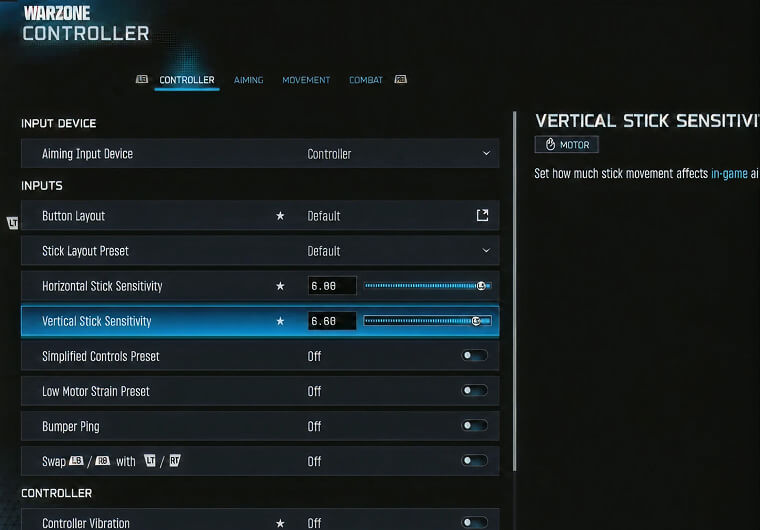
The best sensitivity for PC depends on input, but both setups should start from one rule: use the lowest sensitivity that still lets you turn 180 degrees comfortably.
For mouse and keyboard, a strong PC baseline is 800 DPI with 5.00 to 7.00 in-game sensitivity. If you prefer a lower-sensitivity FPS style, start at 800 DPI and 4.00 to 5.00. If you play aggressively with SMGs, 800 DPI and 6.00 to 7.00 gives more room for fast camera correction.
For controller on PC, start with 6-6 or 7-7, then keep ADS lower than hip-fire. Warzone on PC can feel faster because of higher frame rates and wider FOV, so avoid copying a console setting blindly if your aim starts skipping past targets.
Best Controller Sensitivity
The best controller sensitivity for Warzone is 6-6 for control or 7-7 for a faster ranked/resurgence style. Do not jump to 10-10 unless your right-stick control is already strong.
Use this setup first:
| Controller setting | Recommended value |
|---|---|
| Horizontal stick sensitivity | 6 or 7 |
| Vertical stick sensitivity | 6 or 7 |
| ADS sensitivity multiplier | 0.80 |
| ADS sensitivity transition timing | Instant |
| Aim response curve type | Dynamic |
| Aim assist | On |
| Aim assist type | Default or Black Ops |
| Controller vibration | Off |
| Trigger effect/adaptive triggers | Off |
If your close-range fights feel slow, raise horizontal sensitivity by 1 before touching ADS. If your long-range beams feel shaky, keep hip-fire sensitivity where it is and lower ADS from 0.80 to 0.75.
Best Mouse Sensitivity
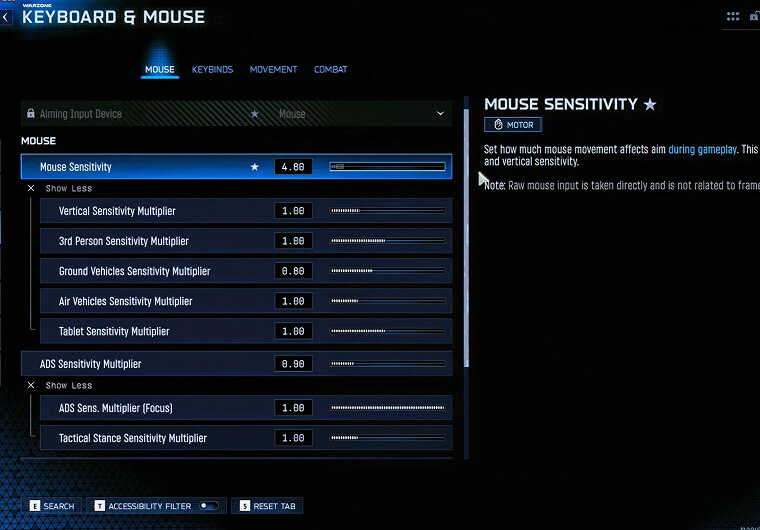
The best mouse sensitivity for Warzone is usually a medium-low eDPI setup. eDPI means DPI multiplied by in-game sensitivity. For example, 800 DPI and 6.00 sensitivity equals 4,800 eDPI.
Start with one of these:
| Mouse style | DPI | In-game sensitivity | eDPI |
|---|---|---|---|
| Low-control | 800 | 4.00 | 3,200 |
| Balanced | 800 | 5.50 | 4,400 |
| Fast SMG | 800 | 7.00 | 5,600 |
| High-DPI equivalent | 1600 | 2.75 | 4,400 |
For most players, the balanced row is the best first test: enough mousepad space for tracking, without feeling slow when a player crosses your screen.
Turn off mouse acceleration in Windows and any mouse software. Keep polling rate at 1000Hz if your mouse supports it. If your aim feels inconsistent, do not change five settings at once. Adjust in-game sensitivity by 0.25, play two matches, then review whether you missed because you were too slow or because you over-flicked.
Best DPI Settings
The best DPI settings for Warzone are 800 DPI for most mouse players, 400 DPI for low-sensitivity players with large mousepads, and 1600 DPI only if you lower in-game sensitivity to keep the same eDPI.
800 DPI is the easiest recommendation because it is fast enough for menus and looting, but still precise enough for recoil control. 400 DPI can feel steadier; 1600 DPI is fine if you lower in-game sensitivity to keep eDPI controlled.
The key is consistency. Pick one DPI and keep it for Warzone, aim trainers, and other shooters whenever possible.
Best ADS Sensitivity
The best ADS sensitivity in Warzone is lower than your hip-fire sensitivity. Start with 0.80 for low zoom and 0.85 to 1.00 for higher zoom optics.
Use these as your first ADS values:
| ADS setting | Recommended value |
|---|---|
| ADS sensitivity multiplier | 0.80 |
| Low zoom custom sensitivity | 0.75 to 0.90 |
| 2x to 3x zoom | 0.85 |
| 4x to 5x zoom | 0.90 |
| 6x to 7x zoom | 0.95 |
| 8x and higher | 1.00 |
| Mouse ADS sensitivity type | Relative |
| Monitor distance coefficient | 1.33 |
Lower ADS helps with recoil and target tracking, especially on assault rifles and LMGs. Higher ADS can help aggressive players who use iron sights or low-zoom optics, but it becomes harder to stay on target when the enemy strafes.
Best Aim Settings
The best aim settings make small corrections predictable. Use Dynamic response curve, keep aim assist on, set ADS transition timing to Instant, and keep deadzones as low as your controller allows.
For deadzones, start at 0 on left and right stick minimum, then raise each value until stick drift stops. If you need a high min deadzone, the controller may be the real problem.
For mouse players, raw consistency matters more than aim assist settings. Turn off acceleration, avoid extra smoothing, and keep ADS Relative so scopes feel connected to your normal mouse movement.
Graphics, FPS and Low Input Lag Settings
Sensitivity feels different when input lag changes. A 6-6 controller setup at 60 FPS can feel heavier than the same setup at 144 FPS, and a mouse setting can feel floaty if V-Sync or heavy post-processing is adding delay.
Use fullscreen exclusive or the lowest-lag display mode available, turn V-Sync off, keep motion blur off, and lower expensive visuals if frame rate is unstable. Revisit settings after major patches if aiming suddenly feels off.
If you are updating loadouts alongside your settings, ARPAY also has Call of Duty guides such as Call of Duty Warzone Mobile and Redeem Call of Duty Cards on PS4/5 and Xbox for players managing COD Points, Battle Pass purchases, or platform credit.
How to Test Your Warzone Sensitivity
Test sensitivity in a repeatable way instead of changing numbers after every death.
Play one match or firing range session with your baseline. Track a moving target, then beam a wall at 20 to 40 meters and watch whether your recoil pull is smooth. If you cannot turn fast enough, raise hip-fire sensitivity by 1 on controller or 0.25 to 0.50 on mouse. If you over-correct while ADS, lower ADS by 0.05.
Only change one setting per test. Changing sensitivity, FOV, deadzone, ADS and aim assist together makes it impossible to know what helped.
FAQ
What are the best sensitivity settings for Warzone in 2026?
Start with 6-6 or 7-7 on controller, Dynamic response curve, Default or Black Ops aim assist, 0.80 ADS, and low deadzones. On mouse, start with 800 DPI, 5.00 to 7.00 in-game sensitivity, Relative ADS and a 0.80 to 1.00 ADS multiplier.
What is the best controller sensitivity for Warzone?
The best controller sensitivity for most Warzone players is 6-6 if you want control or 7-7 if you want faster close-range reactions. Keep ADS around 0.80 so long-range tracking stays stable.
What is the best mouse sensitivity for Warzone?
The best mouse sensitivity is usually 800 DPI with 5.00 to 7.00 in-game sensitivity. This gives a practical eDPI range for both close-range turns and medium-range recoil control.
What are the best DPI settings for Warzone?
800 DPI is the best starting point for most Warzone mouse players. Use 400 DPI if you prefer very low sensitivity and have a large mousepad, or 1600 DPI with lower in-game sensitivity if you want the same eDPI at a higher sensor setting.
What is the best ADS sensitivity for Warzone?
Use 0.75 to 0.90 for low zoom and 0.85 to 1.00 for higher zoom optics. Lower ADS sensitivity helps recoil control, while higher ADS helps faster target switching.
What are the best aim settings for Warzone?
Use Dynamic response curve, aim assist on, Default or Black Ops aim assist, Instant ADS transition timing, vibration off, adaptive triggers off, and the lowest deadzones that do not cause stick drift.